A Budget Project for High School Personal Finance That Students Actually Remember
By David's Data Warehouse · · 5 min read
Ask students what a budget is and most will say "a list of what you spend." Ask them to build one for a real job in a real city and the room changes. Suddenly they want to know why a paycheck is smaller than the salary, how much an apartment costs, and whether a car is worth it. A good budget project turns personal finance from vocabulary into decisions.
This guide walks through how to design a budget project for high school (or upper middle school) personal finance, what each phase should teach, a 2-4 day pacing plan, and how to grade it without drowning in arithmetic.
Why a budget project works
Many states now require a personal finance course or unit for high school graduation, and budgeting sits at the center of nearly every set of standards. A project-based approach works because it makes students:
- start from income, not spending, so they see where money comes from,
- make trade-offs between needs and wants with a fixed amount,
- deal with uncertainty, since real budgets get surprised, and
- compare outcomes with classmates who had different careers and choices.
Phase 1: Give every student a life
The most engaging budget projects assign each student a career instead of letting everyone pick "YouTuber." Random assignment creates variety and great discussions. Use a mix of careers with different education paths: trades, health care, public service, technology and business. Use real pay data: the U.S. Bureau of Labor Statistics Occupational Outlook Handbook publishes median pay by occupation. Point out to students that a median is the middle of all workers, so entry-level pay is often lower.
Tie education to debt. If a career typically requires a degree, give that student a student loan payment. It's one of the most memorable lessons in the project.
Phase 2: From salary to take-home pay
This is where students get their first shock. Walk through gross pay, payroll taxes (Social Security and Medicare), and estimated income taxes to get net, or take-home, pay. You don't need a full tax lesson. A clearly labeled, simplified estimate is enough to make the point that the number on the job posting isn't the number in the bank account. Be explicit that it is a classroom estimate, not tax advice.
Phase 3: Build the monthly budget
Give students a menu of realistic choices for the big categories: housing, transportation, food, phone, insurance, and wants like dining out, subscriptions and pets. Price menus keep the project moving because students choose rather than search the internet for 20 minutes. Have them tag each line as a need or a want.
Then introduce the 50/30/20 rule as a benchmark: about 50% of take-home pay for needs, 30% for wants, and 20% for savings and debt payments. It's a guideline, not a law. Students in high-cost housing or with large loans may not hit it, and that's a discussion worth having.
Phase 4: Life happens
A budget that balances on paper is only half the lesson. Surprise events, such as a car repair, an ER visit, a cracked phone, or a bonus or tax refund, force students to decide how to respond: use savings, cut wants, or put it on a credit card. When students watch credit card interest grow on a $600 repair, the case for an emergency fund makes itself.
Phase 5: Savings goals and reflection
Finish with a savings goal tracked over several months so students see time and consistency at work. Close with reflection questions:
- What surprised you most about your take-home pay?
- Which want would you give up first, and why?
- How did your emergency fund (or lack of one) change the way you handled surprises?
- If you could change your career or education path, would you? What would it cost?
A whole-class "line up by take-home pay" activity at the end is a quick, powerful way to compare careers.
Suggested pacing (2-4 class periods)
- Day 1: assign careers, calculate take-home pay, and discuss gross versus net.
- Day 2: build the budget, check it against 50/30/20, and revise.
- Day 3: handle surprise expenses and track the savings goal.
- Day 4 (optional): reflection, class comparison, and presentations.
Grading without checking everyone's math
The hardest part of a budget project for teachers is checking 30 different budgets with 30 different incomes. Two fixes:
- Grade decisions, not arithmetic. A simple 20-point rubric can cover a balanced budget, reasonable needs and wants, a plan for each surprise, a savings goal, and thoughtful reflection answers.
- Let a spreadsheet do the math. When every total calculates automatically, class time goes to money conversations instead of calculator errors. Spreadsheets also build a workplace skill students will use for years.
Common pitfalls
- Unrealistic prices. Give example prices and let students (or you) adjust them to your area.
- Everyone picks the same job. Random draws fix this. Make sure the draw doesn't change if a student reopens the file.
- Broken formulas. Protect the formula cells so students type only in the input cells.
- Too long. Keep it to a week at most. Momentum matters more than detail.
A ready-to-run option: the Adulting Budget Simulation
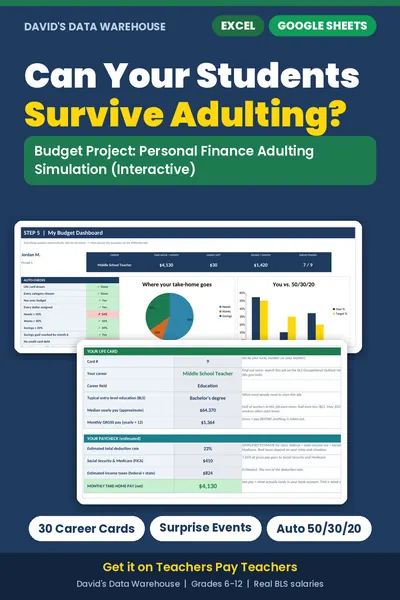
If you want this project without building it from scratch, the Budget Project: Personal Finance Adulting Simulation ($8 on Teachers Pay Teachers) follows the phases above in an interactive workbook for Excel and Google Sheets:
- students draw one of 30 careers with approximate national median pay from the BLS,
- a paycheck tab estimates Social Security, Medicare, income taxes and take-home pay (a labeled, simplified estimate),
- dropdown menus build the budget, with every item tagged as a need or a want, and live 50/30/20 checks,
- 3 surprise cards per student, a 6-month savings tracker, and a dashboard with 9 auto-checks and 3 charts,
- a printable reflection sheet that fills in each student's numbers and asks 8 discussion questions, and
- a Teacher Key that shows the career, take-home pay and surprise cards for any lucky number, plus Teacher Notes with sources, pacing and a 20-point grading idea.
It has no macros and no passwords, the draw is locked to each student's number, and there are separate student and teacher files, ready for Google Classroom's "make a copy for each student." Salaries, prices, surprises and tax bands are all editable.
Bottom line
The best budget projects start with income, force real trade-offs, throw in a surprise or two, and end with reflection. Whether you build your own or use a ready-made simulation, students leave knowing why take-home pay matters and why an emergency fund is worth it.
Looking for spreadsheets for your own classroom records? See our guide to tracking student data in Excel.

David's Data Warehouse is an independent, teacher-made resource shop. Microsoft® Excel® is a trademark of Microsoft Corporation.