IEP and 504 Accommodations Tracking Sheet: What to Track and How
By David's Data Warehouse · · 5 min read
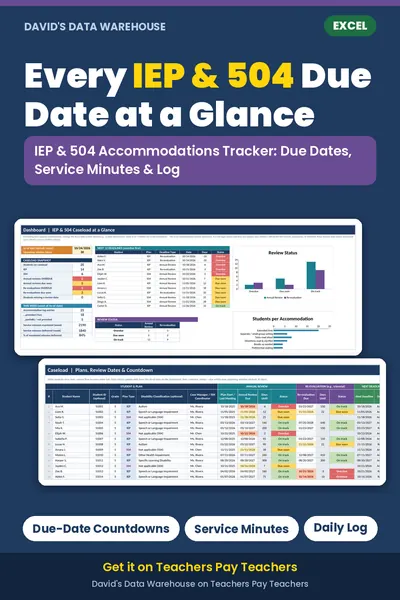
Every teacher who has students with IEPs or 504 plans gets the same two questions sooner or later: "Which accommodations does this student have?" and "Can you show they were provided?" An accommodations tracking sheet answers both. It puts every student's accommodations on one page and keeps a dated record of what you actually did. Here's what to include and how to keep it manageable.
This article is general information for teachers, not legal advice. Your district's procedures, forms, and timelines always come first.
IEP vs. 504: a quick refresher
- An IEP (Individualized Education Program) is a plan for a student who qualifies for special education under the Individuals with Disabilities Education Act (IDEA). It can include specially designed instruction, related services, goals, and accommodations.
- A 504 plan comes from Section 504 of the Rehabilitation Act of 1973. It provides accommodations and services so a student with a disability has equal access to education. It usually doesn't include specially designed instruction or annual goals the way an IEP does.
For a classroom teacher, both mean the same practical job: know each student's accommodations, provide them, and be able to show it.
Accommodations vs. modifications
It helps to label these correctly in your tracker. An accommodation changes how a student learns or shows learning (extended time, read-aloud, a separate setting, breaks) without changing what they're expected to learn. A modification changes what the student is expected to learn or how they're graded (fewer or different standards). Modifications generally come from an IEP; if you see one listed, make sure it's tracked separately from accommodations.
Why teachers track accommodations
Under IDEA, each teacher and provider responsible for carrying out a student's IEP must have access to it and be told their specific responsibilities, including the accommodations they provide. In practice that means a general education teacher may have several students with different plans in one class period. A one-page matrix is the easiest way to keep them straight, especially for substitutes and testing days.
A log also helps when you meet with families, case managers, or a 504 team. "She received extended time on all four unit tests and used it on three" is much more useful than "I think so."
What to include in an accommodations tracking sheet
1. A caseload or class roster
- Student (name or ID)
- Plan type: IEP or 504
- Case manager or 504 coordinator
- Annual review date (IEP) or next review date (504)
- Re-evaluation date
Under IDEA, an IEP must be reviewed at least once a year, and a student must be re-evaluated at least once every three years unless the parent and district agree it isn't needed. Section 504 requires periodic re-evaluation; many districts review 504 plans every year. Enter the dates from the plan itself rather than calculating them, because your district's timeline is what counts.
A countdown column (=E2-TODAY() gives days remaining) with Conditional Formatting, such as red for overdue and amber for due within 30 days, is enough to make sure no date sneaks up on you.
2. An accommodations matrix
List students down the side and accommodations across the top, then mark Y for each one the student has. Common examples teachers track include:
- Extended time
- Separate or small-group setting
- Tests read aloud (where allowed)
- Breaks
- Preferential seating
- Use of a calculator
- Graphic organizers
- Copies of notes
- Directions repeated or clarified
- Check for understanding
Use your district's wording exactly. If the plan says "extended time (1.5x)", your tracker should say that too. Testing accommodations for state tests may have specific rules, so check your state's testing manual.
3. Service minutes (if you provide services)
Special education teachers and related service providers often need to show minutes delivered against minutes mandated. For each service, record sessions per week and minutes per session; multiply for mandated weekly minutes. Then compare with minutes delivered from your log. Note sessions missed because the student or provider was absent or school was closed. Many districts track make-up sessions too.
4. A dated log
The log is the part that protects you. One row per entry:
- Date
- Student
- Accommodation or service
- Setting (classwork, quiz, unit test, state test)
- Status: provided, partially provided, declined by student, or not provided
- Short note
"Declined" matters: some students choose not to use an accommodation, such as extended time, and recording that is part of accurate documentation. Follow your district's guidance on what to do when a student repeatedly declines.
Keep it lightweight
A tracker that takes 20 minutes a day won't survive October. Some tips:
- Log tests and assessments every time, and routine classroom accommodations in a weekly batch if your district allows.
- Use dropdowns for students, accommodations, and status so entries are fast and consistent.
- Build the summary from the log.
COUNTIFScan count how many times each student received each accommodation, so you never tally by hand. - Print the matrix for your substitute folder.
Privacy matters
IEP and 504 information is confidential and protected by laws such as FERPA. Store your tracker only where your district allows student records, such as a district-managed drive, and share it only with staff who need it. Don't email it to personal accounts, and remove student data from any copy you share as an example.
A ready-made Excel option
If you want this set up already, the IEP & 504 Accommodations Tracker from David's Data Warehouse is one Excel workbook for up to 40 students. It includes a caseload tab with annual review and re-evaluation countdowns, a 20-item accommodations checklist you can rename to match your district's wording, service minutes, accommodation and service logs, and a dashboard listing the next 12 deadlines. It's an organizer, not a replacement for your district's IEP system, and it doesn't calculate legal deadlines; due dates come from what you enter.
Working with multilingual learners too? Read NYSESLAT levels explained, or grab the free i-Ready class tracker. For spreadsheet basics, see how to track student data in Excel.
